

Smart Return Bin Troubleshooting
Troubleshooting Your Smart Return Bin
Section titled “Troubleshooting Your Smart Return Bin”This guide is intended to help Operators of the Reusables program to troubleshoot their Smart Return Bin and resolve the most common issues.
Glossary
Section titled “Glossary”- Brim LED: the lights on the front of the Smart Return Bin that ring the door that can be:
- White: ready for container scan
- Green: container scanned and return is in-progress
- Orange: the door is obstructed while a return is in-progress
- Red: bin is full and cannot accept containers
- QR Scanner: the front mounted camera that scans container QR Codes
- NB: only valid Reusables provided QR codes will cause the door to open
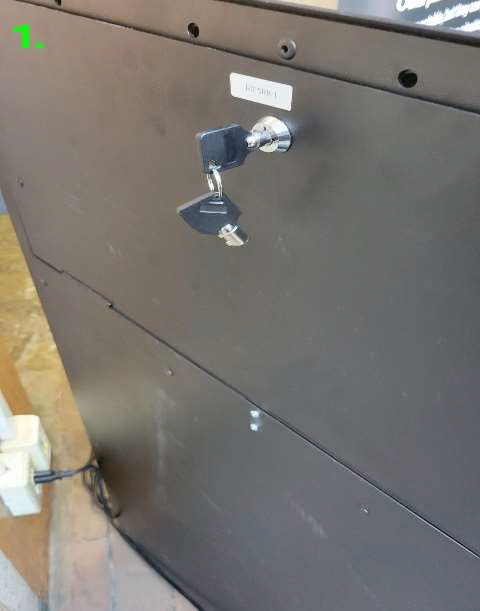
- Hatch: door on the back of Smart Return Bin that can be opened with a key to access unit internals
When the door brim LEDs are Red
Section titled “When the door brim LEDs are Red”- The liners are full. Empty both liners and then re-install them
- If the red light doesn’t return to white after reinstalling the liners, ensure the liners are sitting flat and square inside the bin.
- If the red light still doesn’t turn white, contact Reusables support
Smart Return Bin Door Flapper Not Opening/Closing
Section titled “Smart Return Bin Door Flapper Not Opening/Closing”- Unplug power from the wall or back of the bin and manually check if there’s any blockage. Clear it if so.
- Plug back in to power and the door should open/close upon a valid container scan
If a soft reboot does not work, proceed to:
Freeing a stuck (‘bound’) bin door
Section titled “Freeing a stuck (‘bound’) bin door”- Scan a container to release the latches (audible sound)
- Manually move the door (push or pull) to roughly the centre of its arc 2b. If the door is closed and it does not move when pushed, proceed to the next section
- Manually move the door back and forth 2-3 times, roughly 30% of the full arc in each direction
- Scan a container again to cycle the door
Freeing a stuck bin door when it’s bound against the latches
Section titled “Freeing a stuck bin door when it’s bound against the latches”Stuck (or bound) in the closed position, pushing towards open)
- Plug the SRB in and power on.
- Remove the liners from the SRB.
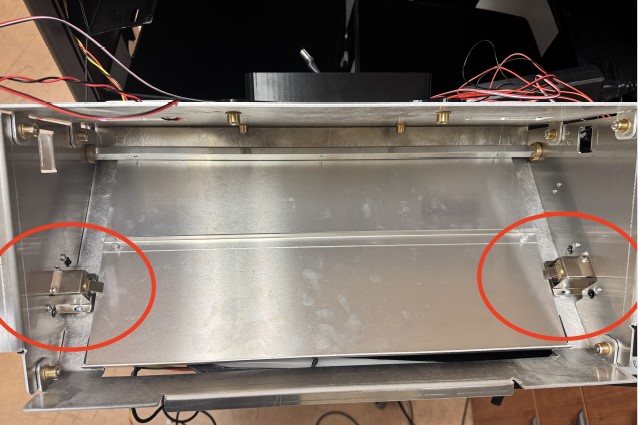
- Look up from inside the SRB, locate the latches circled in red
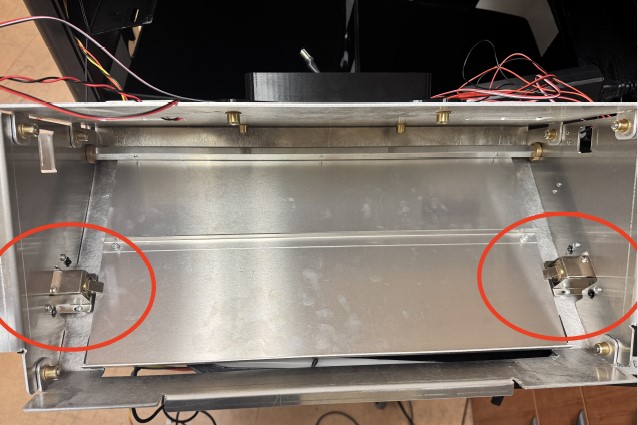
- Carefully hold the door with one hand while poking the tooth of one latch back into its body then repeat with the other latch. This will allow the door to release and fall down into the body of the SRB. 4b. If the door does not move on its own, push the door to the centre of its arc (once the latches are retracted), then move it back and forth 2-3 times 30% of its total arc in each direction
- Test a container scan a few times. If the door opens and then closes each time, it’s fixed!
- If the door is still not moving, manually push the door towards the open position and then pull it back 1 inch without re-engaging the latches. Repeat this action two more times and then try a container scan again.
- If the door is still not opening, contact support.
Orange Light while door is closed:
Section titled “Orange Light while door is closed:”- Unplug power from the wall or back of the bin and plug back in. The orange light should turn white again.
- If the orange Brim LED light still doesn’t go white, contact support
Orange Light while door is open:
Section titled “Orange Light while door is open:”- Unplug power from the wall or back of the bin and manually check if there’s any blockage. Clear it if so.
- Plug back in to power and the door should close and the orange light should go white.
- If the orange light still doesn’t go white or the door doesn’t close, contact support.
Brim LED light is primarily White, but a few spots of Red
Section titled “Brim LED light is primarily White, but a few spots of Red”- Normal operation. This means data is being transmitted
Contacting Reusables Support
Section titled “Contacting Reusables Support”If any of the above steps fail to fully resolve your Smart Return Bin email
support@reusables.com with:
- Your Smart Return Bin location
- SRB # (visible from outside the back hatch, label above the lock)
- A description of the issue with any pictures or video that will help us diagnose the issue
- Steps you’ve taken to troubleshoot in as much detail as possible
- Contact information for anyone on-site who is positioned to support remote troubleshooting